HELP HELP HELP with PC to Mac

I need to burn a CD that has (pagemaker 7.0) files written on a PC (running Win98SE) so that a Mac (a G-3 1.?) can except and open the disk. Does anyone have an idea if there is a program (or can Nero do it) that can convert the
PC CD into a Mac compatible CD when burning. I'm having problems with trying to get my fire districts newsletter printed and the deadline has already passed. Thanks for all your help. :confused:
 
Thanks VIPER_1069

VIPER_1069 said:
use nero and make a CDROM HYBRID disk this whould be compliant with a MAC :)

I'm not sure if I know how to make a CDROM Hybrid in Nero. Is there an area that tells me how to do this in the nero program?
 
from the NERO help documentation
Caution: Neither the ISO data nor the HFS data nor both data together may exceed 640 MB as they will not fit on the CD.

Insert an empty CD into the recorder.
Start a new compilation by clicking on the appropriate button or the File menu and the command New.
Click the 'CD-ROM (Hybrid)' icon - the Hybrid tab is in front. It shows the existing Mac partitions. If the list is blank then no SCSI harddisk with HFS data has been found. Select the required HFS partition.
On the ISO tab you can toggle between Mode 1 and Mode 2/XA format as required. You should not need to verify the format ? in the past there were problems with CD drives that could not read Mode 1 CDs, but very few of these drives should still be in use today. If these options are grayed it means that selection is not logically possible at present. Mixing Mode 1 and Mode 2/XA tracks on a CD would result in an unreliable and potentially unreadable CD format. In the 'File/Directorynames length' section you can specify the ISO level for the length of the names. Up to 31 characters are permitted for Windows 95 and higher. Names cannot be more than 11 characters long for Windows 3.1 (8 for the name and 3 for the extension). ISO Level 2 will be best in most cases ? if you know that the CD must also be readable on a Windows 3.1 system then you should select Level 1.
On the Label tab you can give your CD a name and overtype the default name 'New'. You can use letters A-Z, digits 0-9 and the underscore character (_) ? diacritics (accents) and spaces are not supported.
On the Dates tab you can specify the date of the compilation and of its files. The current date and time are entered for the compilation as default, also the creation date of the files.
Use the Misc tab to specify which files will be buffered in the cache. Files that are on slow media (floppy disks and network drives) and are very small are moved to the cache by default. You specify the location of the cache on the Cache tab in the File menu (Preferences option).
Once you have selected your settings, click the New button on the right. You will now see the empty compilation window for CD-ROM. If a File Browser is not open yet you can open one by selecting New File Browser from the View menu or clicking the appropriate 'File Browser' icon. To specify that Nero is started with an open File Browser, check 'Start with File Browser' in the 'General' section on the File Browser tab (File -> Preferences).
Compile the files for the CD using Drag&Drop editing by simply clicking on the required files in the File Browser and dragging them into the compilation window. First, the files for the ISO part of the Hybrid CD or that will be 'visible' later on the PC, and second the files for the HFS part of the Hybrid CD which will be visible later on the Mac.
Note: The layout of the file icons, the drive icon and the window positions on the Apple Mac are defined by the settings on the selected HFS partition.

Clicking the right mouse button opens a context menu where you can selectively add or omit certain file types. In addition there are a number of commands that you will also find in Windows Explorer, such as 'Copy', 'Open' and 'Cut'.

Click on the Write CD button or select the Write CD command from the File menu to open the write dialog box. This option is only available when the compilation window is selected, as can be seen from the fact that the title bar is blue. If the File Browser is selected (and the title bar of the compilation window is therefore grayed) the option is not available and CD writing cannot be started. In this case click anywhere in the compilation window. The 'Write CD' dialog box now opens - it is the same as when creating a new compilation but the Burn tab is now in front.
In the 'Action' section activate the other check boxes you require in addition to the 'Write' check box. You will find more information about this section in 'The Burn tab'. You must remember that when you create a CD with only one session you must activate the 'Finalize CD' checkbox. This setting write protects the CD and no further writing is possible. (With a Multisession CD this checkbox is only checked for the last session of the CD.)
All settings on this and the other tabs can now be reviewed and changed if required.

Click on the Burn button to start the burn process (or the simulation - depending on the chosen option). All the selected steps now run in sequence until writing is complete. You can monitor progress in a status window which shows the individual steps being logged as they are executed. A typical final message would be: 'Burn process was successful with 12x (1800 KB/s)'. The CD is then ejected. The messages shown can either be saved, printed or discarded. Close the window by clicking on the Discard or Close buttons.
You can now check what has been written to your new CD by inserting it again and clicking the 'CD Info' icon.
 
Nero's hybrid disk construction has always been a fat scam- it won't work if you don't have a MAC volume at your PC... NOT in your network neighbourhood (eg PCMaclan volume), but in your PC!
You have to use either WinOnCD (which does the job pretty fine, it even manages well forked data), or a dedicated program called CDanywhere.
The commandline mkisofs has everything one would ever wish to make a MAC or hybrid CD, but AFAIK there is no mkisofs GUI which utilizes those features.
 
Viper thanks for your help

scarecrow said:
Nero's hybrid disk construction has always been a fat scam- it won't work if you don't have a MAC volume at your PC... NOT in your network neighbourhood (eg PCMaclan volume), but in your PC!
You have to use either WinOnCD (which does the job pretty fine, it even manages well forked data), or a dedicated program called CDanywhere.
The commandline mkisofs has everything one would ever wish to make a MAC or hybrid CD, but AFAIK there is no mkisofs GUI which utilizes those features.

Scarecrow,
I've never had to deal with any of this before, so bear with me. The commandline mkisofs, is this apart of the CDanywhere program? Is it better to get the CDanywhere or the WinOnCD program? Your opinion is greatly appreciated.
Have you heard of the conversion program that deals with converting from Mac to PC and/or PC to Mac called TransMac? I'm not sure if you understand the problem I'm having. I do a newsletter for the fire district I work for. I use the program pagemaker 7.0 (per the printers request) but I have a PC and they have a Mac. You can see the problem. There Mac is an older Mac and can't automatically convert. The printer company's CDROM also has a problem recognizing my CD. Maybe I need the TransMac and one of the other programs. What are you thoughts?
Thanks again!
 
Thanks everyone for your help.
I was looking in the Nero program Help and found that Nero can only make Hybrid CD's if the PC is hooked up with a HD that has a Mac partition on it. Those can only be made by a Mac computer!! Anyway, I need a code generator (or a code)for a program called TransMac. Again I think that this needs a Mac Partioned HD. I'll work on that HD if someone can help with a code. Thanks again everyone.
 
It was going so well until you asked for a code - have a friendly warning instead!

And maybe Demosten CDRTOOLS Frontend, which has a checkbox for HFS and hybrid, may be your answer

http://www.demosten.com/cdrfe/

1.3 only went FINAL recently - I know our "local" frontend is "BurnAtOnce" (with a forum here), but Demosten's "Visual ISO" method for making a file compilation is prettier - though by all reports, BAO wins on robust reliability

I guess I should look at the latest Burnatonce, but my installed 0.96 doesn't offer HFS - (though it's up to 0.99B now - time I updated for a fair comparison)

Mind you, the other one was only 1.2Beta 4, and HFS has been there for a while - oh, and of course, it's FREE!
 
Ooops, my mistake- sorry... the correct program name is CDEveryhere: http://www.i2rd.com/CDEveryWhere/download.shtml
It is mkisofs with a java GUI, and not even half of the mkisofs hybrid options implemented.
The offered demo is limited to 50 MB of data.
Roxio/Cequadrat, which makes WinOnCD does not currently offer a demo. They were offering WinOnCD Power Edition 5 (in fact, the best version of that program ever released...) for free one year ago and for 4 hours, but you are a bit late. Maybe they will repeat the x-mas gift again this year, keep contact.
By the way, if your pal has a MacOS X box you don't need any special software... MacOSX reads joliet volumes right out of the box.
Finally MACdrive is good only for extracting usable data on your harrdisk out of MAC removable media (diskettes and CD's).
 
Last edited:
scarecrow said:
Ooops, my mistake- sorry... the correct program name is CDEveryhere: http://www.i2rd.com/CDEveryWhere/download.shtml
It is mkisofs with a java GUI, and not even half of the mkisofs hybrid options implemented.
The offered demo is limited to 50 MB of data.
Roxio/Cequadrat, which makes WinOnCD does not currently offer a demo. They were offering WinOnCD Power Edition 5 (in fact, the best version of that program ever released...) for free one year ago and for 4 hours, but you are a bit late. Maybe they will repeat the x-mas gift again this year, keep contact.
By the way, if your pal has a MacOS X box you don't need any special software... MacOSX reads joliet volumes right out of the box.
Finally MACdrive is good only for extracting usable data on your harrdisk out of MAC removable media (diskettes and CD's).
No its not the correct Mac OS. It's an older version that won't read automatically
 
If your document is smaller than 50 MB (with fonts and all parahpernalia embedded), then the CDEverywhere demo should be fine. Just don't fork anything for PC and Unix users, and make a pure MAC volume. The program will create an ISO, which you can burn with pretty much anything on your PC.
Else, read the mkosofs documentation carefully, and build a script at your leisure- you can use it later to make your MAC ISO. If you have some experience in scripting you can even make it interactive, so it could serve you well in the future for making more hybrid CD's for no money at all.
 
Last edited:
scarecrow said:
If your document is smaller than 50 MB (with fonts and all parahpernalia embedded), then the CDEverywhere demo should be fine. Just don't fork anything for PC and Unix users, and make a pure MAC volume. The program will create an ISO, which you can burn with pretty much anything on your PC.
Else, read the mkosofs documentation carefully, and build a script at your leisure- you can use it later to make your MAC ISO. If you have some experience in scripting you can even make it interactive, so it could serve you well in the future for making more hybrid CD's for no money at all.
The document is smaller than 50mb. In fact it is approximately 7mb. *Question,
*Do I still need a hard drive with a Mac OS on it (when I use the CDEverywhere) in order to make a CD that Mac users can read/use? The printing company that my district is using has an older Mac that cannot read other formats.
 
jh3463 said:
The document is smaller than 50mb. In fact it is approximately 7mb. *Question,
*Do I still need a hard drive with a Mac OS on it (when I use the CDEverywhere) in order to make a CD that Mac users can read/use? The printing company that my district is using has an older Mac that cannot read other formats.
NOPE! Absolutely not... just use the demo, creat your ISO image and burn it to CD with your favorite windoze application. NO MAC disks needed in a range of 1,000 miles or maybe even further... I have burned countless MAC CD's this way (mainly DTP documents- from Quark, Illustrator, Indesign...).
 
Last edited:
Thank you, Thank you, Thank you

scarecrow said:
NOPE! Absolutely not... just use the demo, creat your ISO image and burn it to CD with your favorite windoze application. NO MAC disks needed in a range of 1,000 miles or maybe even further... I have burned countless MAC CD's this way (mainly DTP documents- from Quark, Illustrator, Indesign...).
scarecrow,
I did use the CDEverywhere and the Nero and the process works great. Now I just need to pay for the full version.

I don't have a clue how to write scripts. Never took a computing class, so I don't get into writing programs (even basic). Not that I couldn't learn, just never had to. I looked at the script writing section on the help document. Don't know what commands to use to get it to do what your suggesting. Is there a list of commands that will help with that?

Anyway, thanks for all your help, it's greatly appreciated!!!

John
 
Might be worth looking at Demosten before buying. It's a free mkisofs/cdrecord frontend (for Win9x-XP) with HFS capability.

Not sure how WELL it's implemented, I do not have access to a Mac (other than the one I use to keep the rain off!).

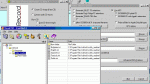
Apologies for (physical) size of image - show the option (I don't understand the extra settings), and the "Visual ISO" composition tool.
 

Attachments

:eek: WOW, $200.00 for the version of CDEverywhere that I need. OH MY GOSH!! I don't know of any other fire fighter's but I can't afford to drop that kind of money. The demo version of CDEverywhere has a 60 days time limit. Does anyone have an idea for me? Thanks for everyone's help.
 
do how about ftping the pc and the mac !? do both have internet access !? make a server one one and transfer the files as a server transition !?
 
LTR12101B said:
Might be worth looking at Demosten before buying. It's a free mkisofs/cdrecord frontend (for Win9x-XP) with HFS capability.

Not sure how WELL it's implemented, I do not have access to a Mac (other than the one I use to keep the rain off!).

Apologies for (physical) size of image - show the option (I don't understand the extra settings), and the "Visual ISO" composition tool.

LTR12101B,
I know that the CDEverywhere works perfectly, but the price tag is too much. Have you used the Demosten program before? Can it make an *.iso* image in strickly Mac format from a PC? Most of the programs I've researched needs the PC to be able to access a Macintosh CD-ROM, Macintosh hard drive, Macintosh high density diskettes or a Macintosh removable drive in order to create the hybrid CD. Do you know if this is one of those programs or is it like the CDEverywhere (that doen't need to be hooked up to anything Macintosh to be able make an *.iso* that can be read only on the Macintosh)?
 
VIPER_1069 said:
do how about ftping the pc and the mac !? do both have internet access !? make a server one one and transfer the files as a server transition !?
Can't do that. The Mac is the professional printing Companies computer. I'm JUST a client to them. I've already approached them in letting me make a Mac HD with their computer so I can have a Mac partition that TransMac could access, but they didn't go for it. Thanks for the idea, but I know it won't fly. I just downloaded the Demonsten program and will try it. Wish me luck!!
 
Top