Nero 6 and memory use

Hi m8s

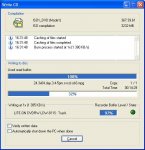
I am using Nero 6.0.0.28 and have noticed that when burning a DVD-R (4X) disk it uses huge amounts of memory. This never happened before to me with other Nero (5.5.10...) or at least I don't remember.
Anyway, do you Nero users have noticed this? Or is it something wrong with my system.

Note: I know that there are lots of anti-Nero folks here but I really apreciate constructive help here instead of the usual "your problem is Nero, dump it".

Thanks a lot pals!
 
Is the size of their "ultrabuffer"? - I really must get round to installing V6 now, as it seems that the initial shakeout of bugs is fading.

In 5.5, you could see the size of the ultrabuffer greyed while it was on AUTO - It gave me 55Mb on my 384Mb system - perhaps V6 is using a more agressive rule for buffer sizing - especially for DVD-R.

A 2Mb drive buffer is pretty slim for the speeds they're running at, so if it all works well (no IDE conflicts from source on same channel as writer), the software buffer can simultaneously load from the source and feed the writer - if they share a channel, then they have to take turns - which CAN work, but increases the probability of underrun protection being required.
 
The Ultra buffer... ok, thanks m8.
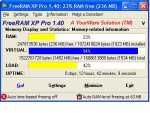
The system becomes very unresponsive when the memory goes so low, the extrange thing is that I have 1GB of RAM here, and when i check FreeRAM XP pro it shows that RAM memory starts to drop until 15%, sudenly it returns to 65% and starts to dop again.
Are you all setting the ultra buffer manually? I have never noticed this in my old Nero, but I installed 6 for compatibility sake with my new Liteon DVDRW LDW811S, Do you think that 5.5.10 works fine with this burner?
 
Duracell said:
no, presumably they don't care their list anymore;
so maybe it's worth a try with 5.5.10.54;
I have tried 3 days ago and I uninstalled it because I saw something extrange in "chose a recorder" window, I don't remember what it was exactly but it was something like generic support for the drive or standard... I don't know, but didn'r give it a chance burning (fool of me). I installed 6.28 an it works ok, but the thing eats memory as a monster when its writing DVD-Rs, my system gets super unresponsive when it is burning, this never happened to me before with my last drive, a Pioneer A04.

Is burning the only way to know if it is compatible or not? I mean: If it comes a coaster then it is not, that is the only way?
 
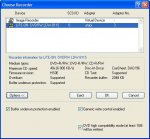
This is what I was speaking about, look the attachment please.

Under choose recorder / Options appears "Generic write control enabled". What does this mean?
 

Attachments

IMHO this looks like fully support for your 811;

i don't know what the check mark "Generic write control" means (because i don't own a DVDRW), but you could install the helpfiles and apply the quick help;
 
Have been looking for the helpfiles without luck in Nero's website, have you any clue about where to find them?

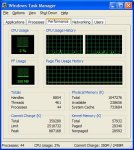
I am burning the first DVD-RW (in media just 1X capable) and I have noticed that 5.5.10.54 also starts to use big amounts of memory. Look these 3 graphics, specially the FreeRamXP Pro one where you can see clearly that the system is starting to have a hard job with the task. I think that Nero is not flushing the memory buffer, but only filling it up until it is really huge, and then it frees it (when the disc is 25% burned or arround that the memory is released and "RAM"in FreeMemXP comes back to 66%), but just for starting the process again, when the disc is on 75% you can see the system again beging for memory, and then it frees it. Hmm... this is really extrange, I have never noticed this before. I will apreciate if other DVDRW drive owners can post their exoeriences about Nero's memory use in their systems. It is the only program that behaves like this inmy setup, and when it is in the critical zone (20% RAM available or less) the system becomes very unresponsive.

Thanks a lot m8s.
 

Attachments

thorz said:
Have been looking for the helpfiles without luck in Nero's website, have you any clue about where to find them?
help files are contained in the language packages: http://www.ahead.de/en/sp_file_previous.php


about your RAM:
1. set Nero's RAM usage manually to 80 MB (Nero > Preferences);
2. dump FreeMemXP, with 1 GB physical RAM you don't need such "tuning" :rolleyes: tools;
3. disable your page file or limit it to 500 MB;
4. [HKEY_LOCAL_MACHINE\SYSTEM\CurrentControlSet\Control\Session Manager\Memory Management]
"DisablePagingExecutive"=dword:00000001
 
Duracell said:
help files are contained in the language packages: http://www.ahead.de/en/sp_file_previous.php
about your RAM:
1. set Nero's RAM usage manually to 80 MB (Nero > Preferences);
2. dump FreeMemXP, with 1 GB physical RAM you don't need such "tuning" :rolleyes: tools;
3. disable your page file or limit it to 500 MB;
4. [HKEY_LOCAL_MACHINE\SYSTEM\CurrentControlSet\Control\Session Manager\Memory Management]
"DisablePagingExecutive"=dword:00000001
1. Thanks for the tip and the help files, I will do it
2. FreeRAMXP doesn't "tweak" anythin :) it just free and clean your ram (defragmeents it) when you need it and cannot restart Windows, its a nice little app and you just launch it when you need, no resident crap here :)
3. Disabling the page file can bring problems with some programs (there are a few, but I cannot remember which they are). And I have tried to limit it to just 512MB (min and max in my system drive) but the stupid XP always allocate 1534!!! MB to the page file, doesn't matter what I do, it always allocate what he thinks as "recommended", it follows the dam rule of 1.5X your phisical RAM :rolleyes:, so if you know a trick that can work for this please tell me.
4. As I have tweaked the system with last Cacheman _http://www.outertech.com/ (highly recommended and freeware) I think that the DisablePagingExecutive value is already set to enable.

Thanks a lot Duracell
 
thorz said:
2. FreeRAMXP doesn't "tweak" anythin :) it just free and clean your ram (defragmeents it) when you need it and cannot restart Windows, its a nice little app and you just launch it when you need, no resident crap here :)
personally i wouldn't trust such "defragmenting tools", but i'm not an expert; let's wait for scarecrows opinion;


3. Disabling the page file can bring problems with some programs (there are a few, but I cannot remember which they are).
i have some older games which insisting of swapping, maybe there are some more apps; if i remember right, well programmed apps (e.g. Photoshop) will create an own swap file if really needed;


And I have tried to limit it to just 512MB (min and max in my system drive) but the stupid XP always allocate 1534!!! MB so if you know a trick that can work for this please tell me.
have no idea what could cause this;
 

Master

Gold Member
Duracell said:
IMHO this looks like fully support for your 811;

i don't know what the check mark "Generic write control" means (because i don't own a DVDRW), but you could install the helpfiles and apply the quick help;
wrong Duracell..i doesn´t look like that the 811 is fully supported. :p

Nero is using a generic driver and not a 811 optimized driver/setting !!

Hmm don´t get me wrong but sometimes nero will give you high cpu and memory usage with a bad serial or a generated serial number.

btw. the 811 is not in the list:
http://www.nero.com/en/recorders.php?manu=LITE-ON&lang=en
 
Last edited:
Not sure if the large amount to "System cache" means that the Windows VCACHE is growing because of the amount of data passing through - I thought Nero could bypass it, but the bypass Windows option is only available when setting Nero to cache files (Preferences setting).

Restricting the windows cache, or using a monitor that will show the file cache, may be useful - not sure how you'd do this in XP, or if you can.
 
I have confirmed exactly what is happening, but don't know why it is happening:
I will burn a DVD with 5 AVIs of 850MB each. Nero starts to fill the phisical RAM with the data of the first file and it fills it until I am only left with 15% of my phisical RAM free (arround 155MB free). It stays there and don't drop anymore until the first file is ready (I can check it in the Nero writing window). Inmediatly that Nero starts to burn the 2nd. file my memory my memory is released and the memory monitor that I am using (freeRamXP) marks 66% free RAM, but it starts to fall again until 15% free RAM, it stays there and repeats the process when the file is ready burned and it pass to the next one.

@LTR12101B:
I see the bypass Windows setting, but it supossed to work only for "drag%droped files from CD-ROM drives" so I am not so sure how this could help in a normal compilation burned from files that are in the hard disk. I am not sure what do you mean with the monitor thing, do you mean monitoring the Nero cache or the XP cache?

@Master:
I have heard also about the Nero behavor and keygens, I cannot speak about this if it is or not true, but even if I were using a generated key (that I am not) I am very sure that I never noticed this behavor with my Pioneer A04 that I just ttook out of my system 3 days ago. I cannot test again with that drive because I don't have it anymore.
I remind you all that I have seen the same behavor in Nero 6.28, and it suposse to recognise fully the 811S.

If anybody has an idea of how can I make Windows XP pro to respect the size of the page file that I am giving to it I really apreciate it, it is using always a pagefile of 1533MB!!! and it only uses something like 4% of it, even in the must critical moments.
 
There are new developments about this issue.
Following Duracell's advice I configured the Nero ultrabuffer manually to 80MB. I also turned off NAV Auto Protect for testing proposses. The good news is that now Nero 5.5.10.54 is not using the huge amount of memory as before, now it is wight there where it has to be. I have burned a DVD-R and the memory never droped below 66% free, and the program never used more memory after I started it, so this is great. i will confirm in my next burn if turning on NAV auto protect doesn't affect, I hope it is not that that is causing the trouble, and that configuring Nero's buffer was the solution.

Thanks againfor all the help here.
 
Edit:

I am sorry, I have posted that the problem was solved, but it was my mistake. This post has been edited. The problem was NOT SOLVED. See the post down for more info about the status of this case.

Thanks
 
Last edited:
Top